
S0Sales & Opportunity Funnels · by Clevertrek
See where every lead stands
Create several sales and onboarding funnels, move contacts on a drag-and-drop board, change steps from the contact card and see the conversion between steps.
ABOUT
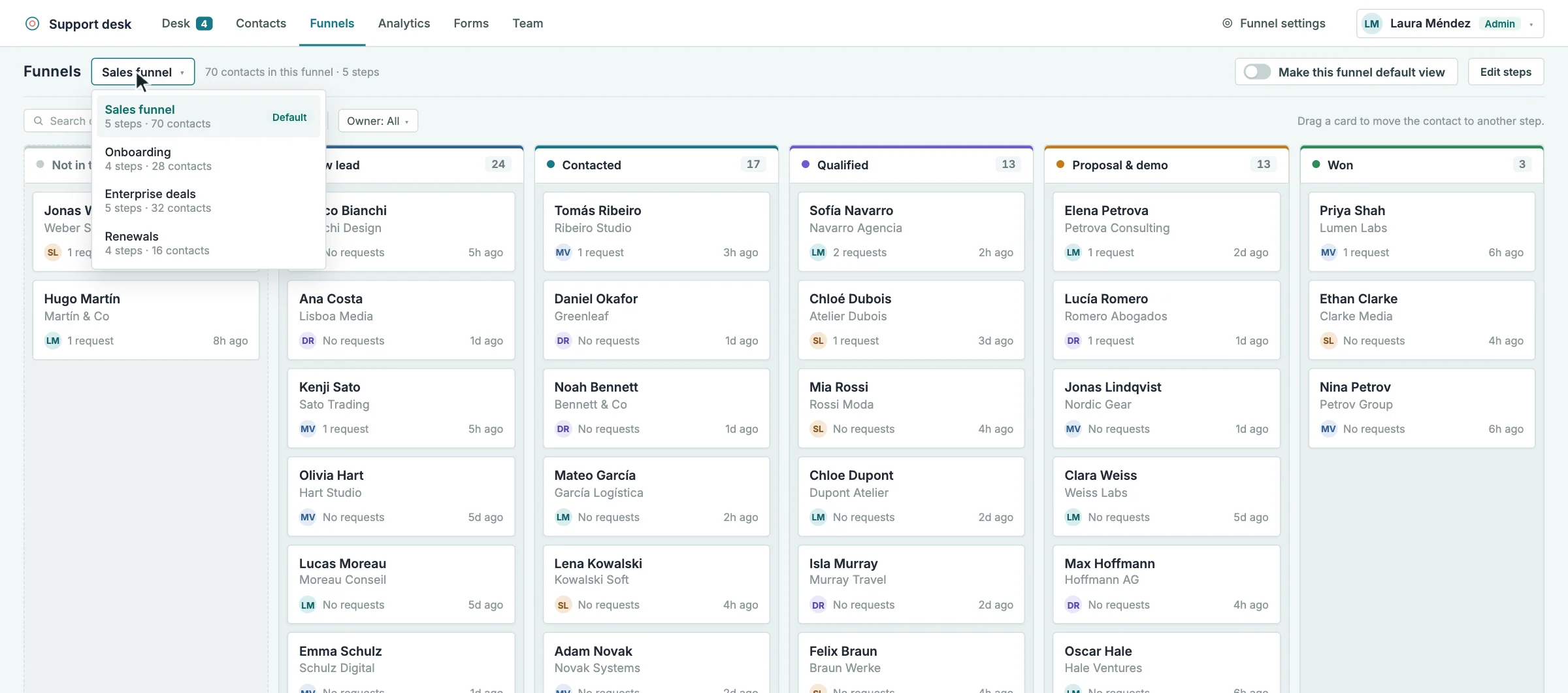
Create as many funnels as you need, such as sales, onboarding or renewals, with your own steps and colours. Funnel settings show how many contacts reached each step and the conversion from one step to the next.
Open a funnel as a board and drag contacts from one column to another, or change their step from the contact card. A contact can be in several funnels at once, one step in each, and every team member can choose their default funnel view.
HIGHLIGHTS
Several funnels per space, each with its own steps
Conversion between steps and contacts reached per step
Board view: drag a contact to move it to another step
Change the step from the contact card
A contact can be in several funnels, one step in each
Each user chooses their default funnel view
Forms can drop new contacts into any step
HOW IT CAN HELP YOU
See where deals get stuck
Keep sales and onboarding on separate boards
Measure the conversion of every step
HOW IT WORKS
01Create a funnel and name its steps
02Let your forms drop new contacts into a step
03Move contacts on the board or from their card
04Check the conversion between steps in Funnel settings
WHO IS IT FOR
Sales teams
Pipeline from new lead to won
Customer success teams
Onboarding and renewals
Small businesses
A simple pipeline without a big CRM
Works well with
All tools and connectors →SDSupport DeskAnswer tickets, follow every contact through your funnels, and launch customizable surveys…CFContact FormsDesign contact forms with your own fonts and colours, embed them with…LALead Acquisition FormsCapture leads with on-brand forms, place them in your funnel with an…
ctadp v2.6.6